AppLock
Unlock more easily and quickly.Most downloaded app lock in Play Store.
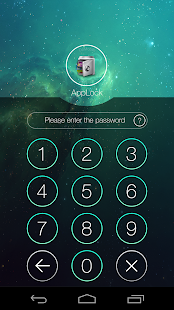
Protect privacy with password, pattern, fingerprint lock.
★ #1 App lock in over 50 countries.
★ Over 200 Million users, supporting 24 languages.
☞ AppLock can lock Facebook, Whatsapp, Gallery, Messenger, SMS, Contacts, Gmail, Settings, incoming calls and any app you choose.
Prevent unauthorized access and guard privacy.
Ensure security.
☞ AppLock can hide pictures and videos.
Hidden pictures and videos are vanished from Gallery and only visible in the photo and video vault.
Protect private memories easily.
No pin code, no way.
☞AppLock has random keyboard and invisible pattern lock.
No more worry people may peep the password or pattern.
More safe!
★ With AppLock, you will:Never worry about a friend borrows your phone to play games with mobile data again!Never worry about a workmate gets your phone to look the gallery again!Never worry about someone reads private data in your apps again!Never worry about kids mess up Settings, send wrong messages, paying games again!
-----------FAQ---------1) How to change password?Open AppLock, Protect, Unlock Settings
2) I hide AppLock icon, how to open AppLock now?
There are two ways to open it:1.
dial padenter #password in your dial pad, and tap call button.2.
Browseropen domobile.com/applock in your browser,
3) How to stop other people uninstall AppLock?Please enable Advanced Protection in Protect of AppLock, so nobody can uninstall or kill AppLock without password.
You can disable Advanced Protection when you don't want it.
4) How to uninstall AppLock?After you enable Advanced Protection, nobody can uninstall AppLock without password.
If you want to uninstall it, please disable advanced Protection first.
5) I forgot my password,How to find it?
Update to the latest version first.
And then tap AppLock icon, click the icon at the up right corner of lock page, tap the 'forgot password'.1.
By security answer: enter your security answer and click 'reset password'.2.
By security email: click 'send code to security email', input reset code and click 'reset password'.
6) I can not move in/out my photo in the vault.Please check you internal storage space, if only 10% free ,system will not let us to move file in to vault.
7) Account TypeThere are three types of account in AppLock.
You can choose it in Account Center.
It is in the left menu of AppLock.1.
Premium: paid, premium features , no ad.2.
AD: free , premium features , ad.
3.
Basic: free, no ad , no premium features.
---Features---
• Lock apps with password lock, pattern lock, or coming fingerprint lock.• Photo vault, hide pictures• Video vault, hide videos • Well designed Themes • Customized background, select a favorite picture• Default profiles: Unlock all, Guest• Customized Profiles: set different locked app groups, change lock quickly• Time Lock: auto-lock/unlock according to time• Location Lock: auto-lock/unlock according to location• Hide AppLock icon• Advanced Protection: prevent AppLock being killed by task killer• Random keyboard: prevent people peeping pin code• Fingerprint、Force stopped cover• Lock switch (WiFi, Bluetooth, mobile data, sync)• AppLock widget: enable/disable AppLock with one tap• Quick lock switch: Lock/unlock in notification bar• Lock incoming calls• Lock system settings to prevent a mess by kids• Lock Google Play to prevent buy games• Allow a brief exit: no need password, pattern, fingerprint again within set time• Prevent uninstalling apps• Low memory usage.• Power saving mode to save battery
Feel free to send your feedback to us!
[email protected]
AppLock will Protect Your Privacy.
website: http://www.domobile.comGoogle+ : https://plus.google.com/communities/103197101424348950425Facebook: http://www.facebook.com/bestapplockTwitter: https://twitter.com/bestapplock
About AppLock
- Package name (App ID)
- com.domobile.applock
- Available on
- Google Play
- Price
- Free
- Developer
- DoMobile Lab
Looking for the AppLock APK?
The safest way to get AppLock (com.domobile.applock) on your Android device is to install it directly from Google Play — you'll always get the latest official version, automatic updates, and no risk of modified or infected APK files from third-party sites.
Social Features
Connect and share with friends and the community.
Gaming Features
Enjoy immersive gaming experience with various game modes.
Camera Features
Advanced camera features with editing capabilities.
See AppLock in Action


Frequently Asked Questions
Is AppLock free?
Yes, AppLock is free to download and install on Android through Google Play.
How do I install AppLock on Android?
Open Google Play on your Android phone or tablet, search for AppLock by DoMobile Lab or tap the Google Play button on this page, then tap Install. The app downloads and installs automatically.
What is com.domobile.applock?
com.domobile.applock is the App ID (package name) of AppLock on Google Play. Every Android app has a unique package name, and it is the safest way to verify you are installing the official app.
Is AppLock safe to download?
Installing AppLock from Google Play is the safest option: you get the official version published by DoMobile Lab, verified by Google Play Protect, with automatic updates. Avoid APK files from unofficial third-party sites.
Get AppLock Today
AppLock for Android — free download on Google Play.
Compatible with Android phones and tablets — available on Google Play.
Ask AI about this app
Get instant answers about features, tips and more from popular AI assistants.